Noon tells you what you sold. SKUmargin tells you what you made.
Accurate profit analytics for Noon sellers. SKUmargin reads your Noon settlement report and tells you what each SKU earned after commission, FBN, ads, refunds and your own costs. Synced from Noon every two hours.
- Net profit per SKU after every Noon fee
- Auto-sync from Noon every 2 hours
- Ads, refunds and expenses in the same number
- COGS history, so old orders stay correct
- Multi-store: UAE, KSA, Egypt
- Local currency AED, SAR, EGP
Free setup help·30-day trial·No credit card
From $15/mo. 30 days free, no card, cancel anytime.

Seller Lab is accurate about revenue. It has never seen your costs.
Noon's console knows exactly what it charged and paid you. It has no idea what you paid your supplier, so it cannot show profit. SKUmargin starts from the same settlement report and finishes the sum.
Five periods, one glance
Today, yesterday, month to date, the month's forecast and last month side by side. Each tile carries sales, orders, refunds, ad cost, COGS, gross profit, margin and net, against the period before. A loss shows red. Orders Noon has not settled yet are counted at the price you had listed that day, with fees estimated from your own history, and the tile says so.
Switch to Chart, P&L, Trends, Ads or VAT without leaving the page.

Every SKU, after everything
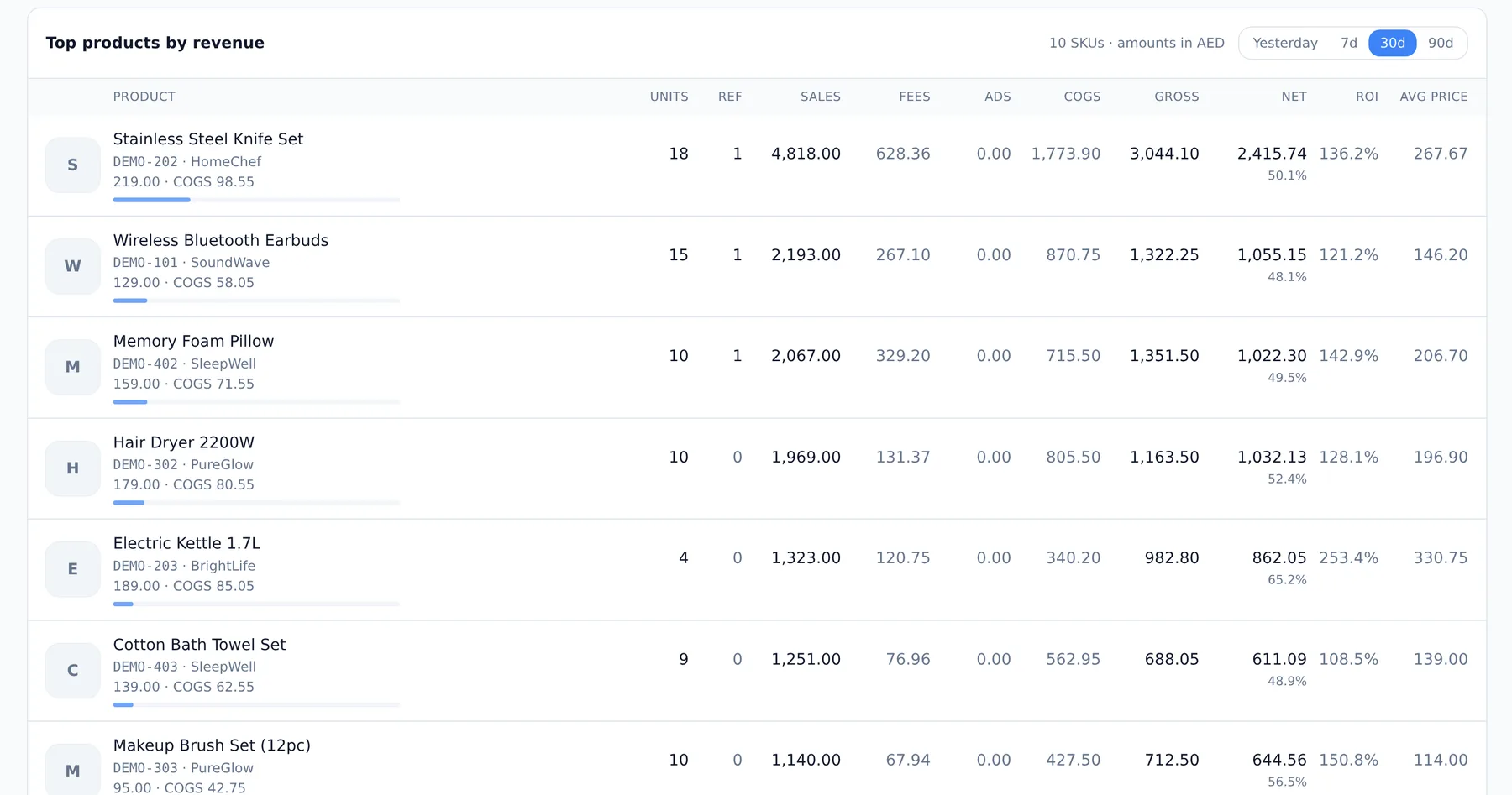
Units, refunds, sales, Noon's fees, your share of what Noon billed for advertising, COGS, net, ROI and average selling price, per product, over any window from yesterday to 90 days. The fee figures are read from your statement lines, never typed. Click a row for the orders behind the number.
A product with no cost entered says so in amber rather than pretending its revenue is profit.
Where the money goes on one SKU
Between the price a customer pays and the profit you keep sit the deductions Noon spreads across your settlement report. SKUmargin lines them up per SKU, per order, automatically, so a breakdown like this one exists for every product you sell. This one is real: my first SKU on Noon.
- Noon commission (15.7%)
- -4.72
- FBN fulfilment
- -8.40
- Landed cost (COGS)
- -12.14
- Net profit per unit
- AED 4.73
16% margin, 39% ROI. Same unit at 21.99: AED 0.09.
My first statement showed FBN at 2.10 a unit, a quarter of Noon's own 8.50 quote, and I believed it. It was wrong: Noon posts the FBN charge a couple of days after the sale settles, so most orders had not had theirs yet. Once every line landed it was 6.30 a unit at 21.99, which left me 9 fils a sale. I had already moved to 29.99, and this is that price. Real figures from my store, VAT reported separately; your fees vary by category and fulfilment type, and SKUmargin reads yours from your own settlement report.
From signup to a real profit number in about ten minutes
Three things, in this order. About ten minutes, then the first sync fills the dashboard.
- 1
Connect your store
Create an API user at partners.noon.com, drop the credentials file into Settings, press Test connection. Orders, settlements, catalogue, prices and ad campaigns then sync every two hours. No API yet? Start with the Seller Lab exports.
- 2
Add your costs
Unit cost per SKU, dated, so last month's orders keep last month's cost when the supplier price moves. Your own shipping per unit if you ship yourself. Bulk upload if you have a lot.
- 3
Read the first real number
Dashboard, per-SKU table, fee breakdown, P&L, ads and VAT, updating as orders sync. Add overheads on the Expenses page and they land in net profit too.

A note from the founder
Noon shows you sales. It doesn’t show you what you actually made.
I sell on Noon myself, and for a long time I had no real idea which of my SKUs were making money and which were quietly losing it once fees, cost of goods, returns and ads came off. Sellerboard solved this for Amazon years ago. Nothing existed for Noon, so I built it.
SKUmargin gives you true profit per SKU, per order and per day. Not revenue, not a margin you guessed at in a spreadsheet, the actual number.
The reason you can trust it is where it gets the data. Every fee on your dashboard comes from your own settlement statement, not an estimate. Anything Noon hasn’t settled yet is marked as such until it has. The first time I did this by hand it took an afternoon with the transaction export and the answer was buried in columns nobody looks at. SKUmargin does that every two hours.
If you’ve been running your store off the sales graph, the first week will probably sting a bit. It did for me.
Setup help is free on every plan, trial included. Open Messages inside the app and I’ll walk you through connecting your store and entering your first costs. Or say “call” and we’ll do it on a 20-minute screen-share. Your credentials stay on your screen; I never ask for them.
James Follis, founder. JMF Dynamic Global (FZCO), Dubai. support@skumargin.com
Before you start: what it needs, and what happens to it
What you'll need
- Your Noon Seller Lab account. Connect the API once and orders, settlements, catalog, prices and ad campaigns sync every 2 hours (recommended), or start by uploading the Orders and Settlement CSV exports.
- Your per-unit product costs (COGS), typed in per SKU or uploaded in bulk. Sellers who ship themselves add their own shipping cost per unit too.
- About ten minutes. The dashboard fills in as soon as the first sync lands.
- Nothing else. No spreadsheet, no developer, no card.
How your data is protected
- Noon API credentials are encrypted at rest with AES-256-GCM, only decrypted in memory for calls to Noon, never logged, never sent to the browser.
- Your numbers are used to calculate your own profitability and nothing else. We never sell or share business data.
- Everything travels over HTTPS. Delete your account and all of its data at any time from Settings.
From the blog
All posts- When Does Noon Pay Sellers? Statements, Thresholds and Timing (2026)Statement days, payout timing and the threshold that holds a payment back.
- Does Noon Seller Lab Show Your Profit? What It Has and What It MissesWhat Seller Lab gets right, and the costs it has never seen.
- How to Connect the Noon Seller API (partners.noon.com)Create an API user in ten minutes and fix the error almost everyone hits.
- Noon Sponsored Ads: ACOS, ROAS and What Noon Actually Bills YouAd Manager spend, what Noon actually bills, and the cost per SKU.
- Noon Seller VAT Report for UAE, KSA and Egypt: What Noon Gives YouThe tax documents and export Noon gives you, and what a return needs.
- NoonSeller Alternative? SKUmargin vs NoonSeller, Honestly ComparedTwo tools with Noon in the name, and the different jobs they do.
Free Noon profit calculator
Work out net profit, margin, ROI, and breakeven price for any product. No signup, runs in your browser. Open the calculator.
Pricing
Start free for 30 days. No credit card required. Free setup support on every plan. Cancel anytime. Annual billing saves 20%.
Standard
$15 /mo
- 3,000 orders/month
- 1 store
- 3 team users
Professional
$23 /mo
- 6,000 orders/month
- 2 stores
- 6 team users
Business
$31 /mo
- 15,000 orders/month
- 4 stores
- 8 team users
Scale
$63 /mo
- 50,000 orders/month
- 8 stores
- 16 team users
All tiers include a 30-day free trial with every feature unlocked, no credit card, and cancel anytime.
Common questions from Noon sellers
- Where is my data stored?
- On managed PostgreSQL (Neon, on AWS) in the United States. Everything travels over HTTPS, your Noon API credentials are additionally encrypted with AES-256-GCM before they are stored, and access is restricted to the systems that calculate your analytics. We never sell your business data, and you can delete your account and everything in it from Settings at any time. UAE-region data residency is on the roadmap; if it matters for your business, tell us.
- Is my Noon seller data safe?
- Yes. SKUmargin is built to handle sensitive seller information such as SKU costs, fees, returns, and profit calculations. Your Noon API credentials are encrypted with AES-256-GCM at rest and never logged, access is restricted, and your data is only ever used to calculate and display your own profitability insights.
- How is SKUmargin different from Sellerboard?
- Sellerboard does not support Noon. It reads Amazon and Walmart reports, and Noon's fees, FBN and settlement format are different enough that nothing maps across. SKUmargin does the same job, built against Noon's own settlement report. If you sell on both, run both.
- Do I need the Noon API to use SKUmargin?
- No, but it is the easy way in. Create an API user at partners.noon.com, drop the credentials file into Settings, and orders, settlements, your catalog, live prices and ad campaigns sync every 2 hours. Without it, upload the Orders and Settlement exports from Seller Lab whenever you like.
- What about orders Noon has not paid out yet?
- Noon settles weeks after the sale. Until the statement arrives, SKUmargin values each unsettled order at the price you had listed on the day and estimates the fees from your own settlement history, and the dashboard tells you how much is still an estimate. When the statement lands, the real figures replace the estimates automatically.
- Do I need to install anything?
- No. SKUmargin is a web app that works in Chrome, Safari and Firefox, on desktop and on your phone.
- Can I cancel anytime?
- Yes. Cancel any time from your account settings. No contracts, no penalties.
- Is there a free trial?
- Yes. 30 days, all features, no credit card required.
- Is setup help included?
- Yes, free on every plan including the trial. Message us from inside the app and we will walk you through connecting your Noon store and entering your first costs, or ask for a 20-minute screen-share and we do it together. Prefer email? support@skumargin.com.
Read your first real profit number today.
Connect your Noon store, enter your costs, and see what each SKU actually earned. 30 days free, no card, and help if you want it.